
Steps
- Open a copy of the file and confirm that the detected delimiter produces sensible columns.
- Review the header and the first range before jumping deeper into the file.
- Use row navigation to inspect later ranges; bookmarks are created periodically to avoid reparsing from the beginning for every jump.
- Make only deliberate edits, save an export, and compare row counts and critical columns with the source.
Supported formats
- Input: delimited text files readable through the browser File API.
- View: paged ranges with detected columns and row navigation.
- Output: an exported CSV reflecting supported edits; spreadsheet formulas and workbook features are outside the format.
Things to know
- Encoding detection is limited; a file may need conversion to UTF-8.
- Malformed quoting or embedded newlines can shift columns.
- Edits are browser-memory operations and are not a transactional database workflow.
- Very wide rows, huge fields, or limited device memory can still affect responsiveness.
Troubleshooting
- If all data appears in one column, choose the correct delimiter or inspect the source with a text editor.
- If accents look wrong, convert a copy to UTF-8 before reopening.
- If row counts differ, check for quoted newlines, blank trailing records, and parser warnings.
Common questions
Does the viewer load the whole file into a table?
It reads and displays ranges, using bookmarks to improve later seeks, although exports and edits can still require additional memory.
Why are rows shifted?
An unmatched quote, unexpected delimiter, or embedded newline can make later fields parse under the wrong columns.
Can it open Excel workbooks?
No. CSV is plain delimited text; XLSX formatting, sheets, formulas, and types require a workbook tool.
Test results
Test results
csv-streaming-study
Tested
Recorded environment
- Browser
- Google Chrome 150.0.7871.182
- OS
- Windows 11
- App revision
86b9bd1+working-tree
Exact test method
Open the edge-case CSV, verify headers and records, jump between indexed ranges, edit a copy, and compare the export.
Independent check
Parse the source and export with Papa Parse in a standalone verification script.
Synthetic fixtures
edge-cases.csv141 B · Synthetic fixture · CC0 1.0
a132bbf75afe38e0…Download fixture ↓expected-results.json298 B · Synthetic fixture · CC0 1.0
329b2c6ea201a4d4…Download fixture ↓generate-large-csv.mjs343 B · Synthetic fixture · CC0 1.0
8ed6668a9f0dd6a3…Download fixture ↓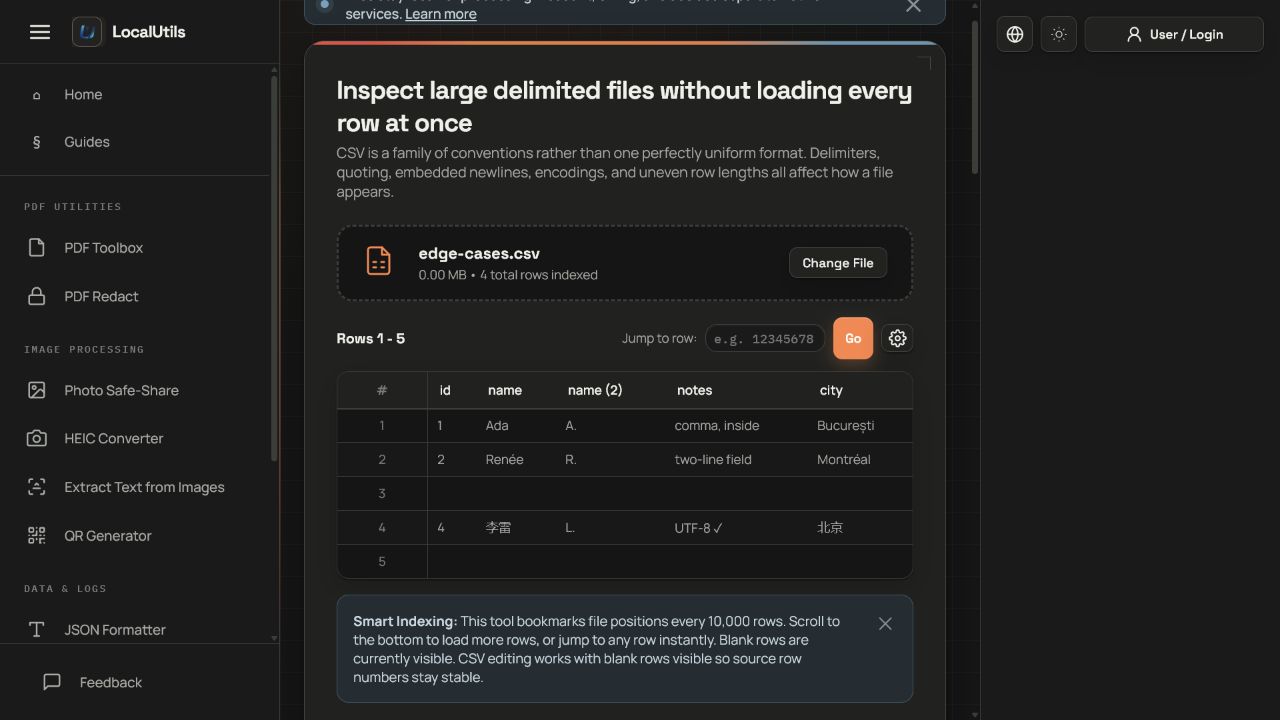
Recorded observations
| Measure | Expected | Observed | Status |
|---|---|---|---|
data_rows_including_blank | 4 | 4 | Matched |
unique_headers | id,name,name (2),notes,city | id,name,name (2),notes,city | Matched |
embedded_newline | preserved | preserved | Matched |
utf8_values | preserved | preserved | Matched |
Scope limits
Large-file speed depends on hardware, browser memory, row width, quoting, storage, and other active tabs.